
x402#
1Shot API offers special API endpoints for facilitating version 1 and 2 x402 payments, check out the OpenAPI specification for the x402 tag.
1Shot API can process x402 payments for any EIP-3009 compatible token on any of the supported EVM networks where you have provisioned and funded a server wallet.
Be sure to deposit sufficient gas funds into your server wallet to cover the transaction costs of the payment transactions.
Import the
transferWithAuthorizationmethod for your target token into your 1Shot API account - for example USDC on Base.Provision an API Key and Secret for your 1Shot API account.
Integrate the 1Shot API x402 endpoints into your application either manually or using your favorite AI-assisted development tool.
Configuring x402 Payment Tokens#
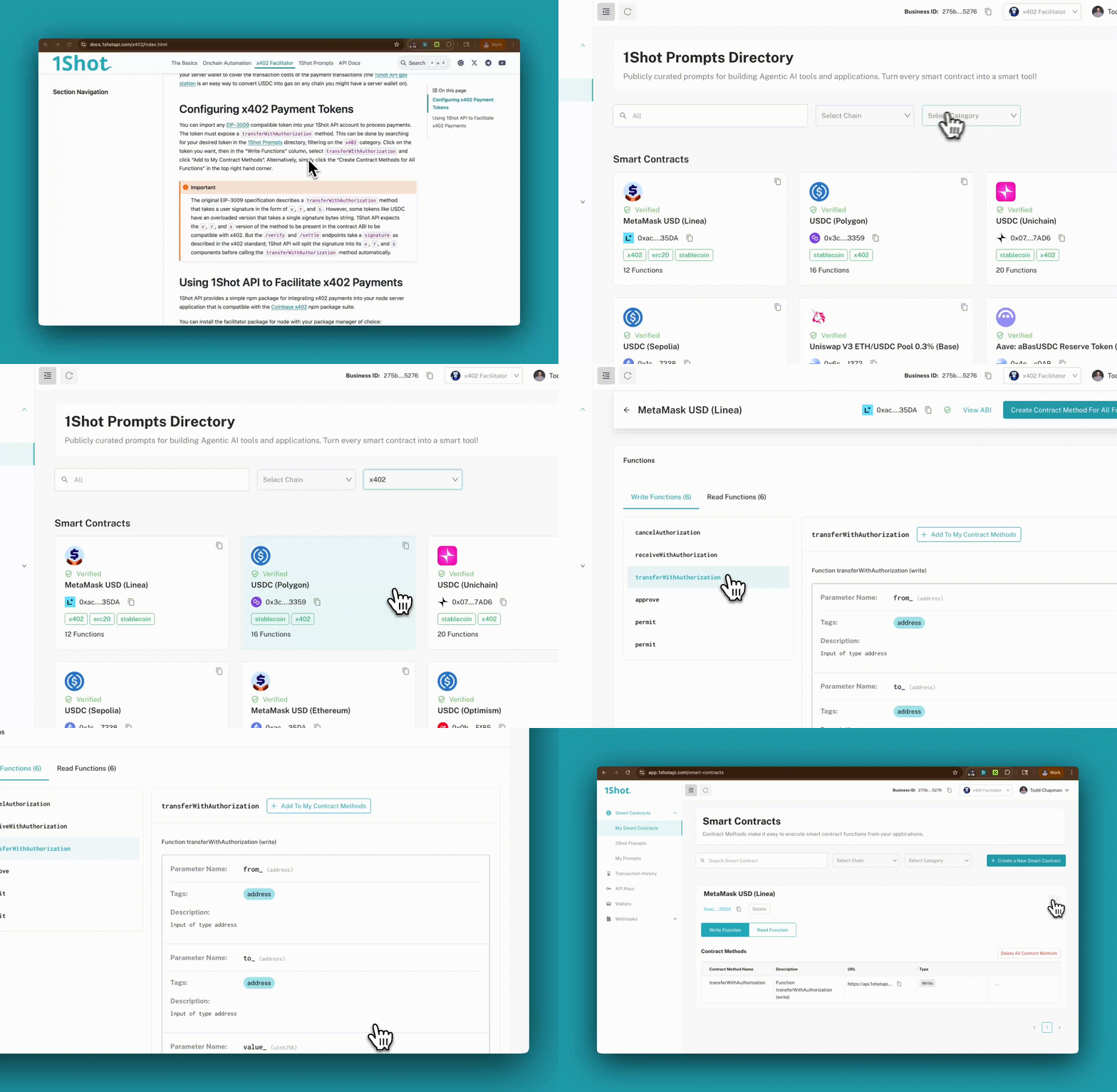
Before you can import a payment token, you must first provision a server wallet on your target network. Then you can import any EIP-3009 compatible token into your 1Shot API account to process payments. The token must expose a transferWithAuthorization method. This can be done by searching for your desired token in the 1Shot Prompts directory, filtering on the x402 category. Click on the token you want, then in the “Write Functions” column, select transferWIthAuthorization and click “Add to My Contract Methods”. Alternatively, simply click the “Create Contract Methods for All Functions” in the top right hand corner.
Important
The original EIP-3009 specification describes a transferWithAuthorization method that takes a user signature in the form of v, r, and s. However, some tokens like USDC have an overloaded version that takes a single signature bytes string. 1Shot API expects the v, r, and s version of the method to be present in the token’s contract ABI. The /verify and /settle endpoints take a signature as described in the x402 standard specification; 1Shot API will split the signature into its v, r, and s components before calling the transferWithAuthorization method automatically. This allows for support for tokens like PYUSD.
Using 1Shot API to Facilitate x402 Payments#
1Shot API provides a simple npm package for integrating x402 payments into your node server application that is compatible with the Coinbase x402 npm package suite.
You can install the facilitator package for node with your package manager of choice:
npm install @1shotapi/x402-facilitator
This package exports create1ShotAPIFacilitatorClient which can be used with the official @x402/express package to create a x402 facilitator client.
Try running our x402-express demo or check out the code example below.
Note
For browser-based agent wallets, we recommend configuring your x402 resource endpoints so they are not blocked by restrictive cross-origin rules—for example by disabling CORS middleware that denies third-party origins, or by setting permissive Access-Control-Allow-* headers on those routes. Otherwise the browser will prevent client-side code from reaching the resources needed for the x402 flow.
import express from "express";
import { paymentMiddleware, x402ResourceServer } from "@x402/express";
import { ExactEvmScheme } from "@x402/evm/exact/server";
import { create1ShotAPIFacilitatorClient } from "@1shotapi/x402-facilitator";

const app = express();
const facilitatorClient = create1ShotAPIFacilitatorClient({
 apiKey: process.env.ONESHOT_API_KEY,
 apiSecret: process.env.ONESHOT_API_SECRET,
});

const evmAddress = process.env.EVM_ADDRESS as `0x${string}`;
if (!evmAddress) {
  console.error("Missing required environment variable: EVM_ADDRESS");
  process.exit(1);
}

app.use(
  paymentMiddleware(
    {
      "GET /weather": {
        accepts: { scheme: "exact", price: "$0.001", network: "eip155:84532", payTo: evmAddress },
        description: "Weather data",
        mimeType: "application/json",
      },
    },
   new x402ResourceServer(facilitatorClient).register("eip155:84532", new ExactEvmScheme()),
 ),
);

app.get("/weather", (_, res) => {
  res.send({
    report: {
      weather: "sunny",
      temperature: 70,
    },
  });
});

app.listen(4021, () => {
  console.log(`Server listening at http://localhost:${4021}`);
});